Dad of Divas' Reviews: computers
Showing posts with label computers. Show all posts

Thursday, December 18, 2014

2 Gecko Monitoring Software Lets You Monitor With Ease #Giveaway


2 Gecko Monitoring Software
 photo disclaimer2_zps8af35ac1.jpg

About the Software
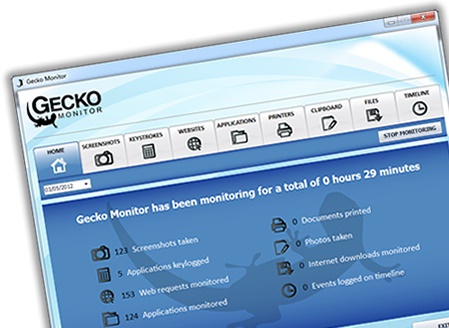
Gecko Monitor is the complete solution to monitoring everything that happens on your computer while you’re away. Perfect for parents who want to monitor their childs computer or bosses who want to monitor their employees computers - Gecko Monitor has everything you’ll need to give you peace of mind!

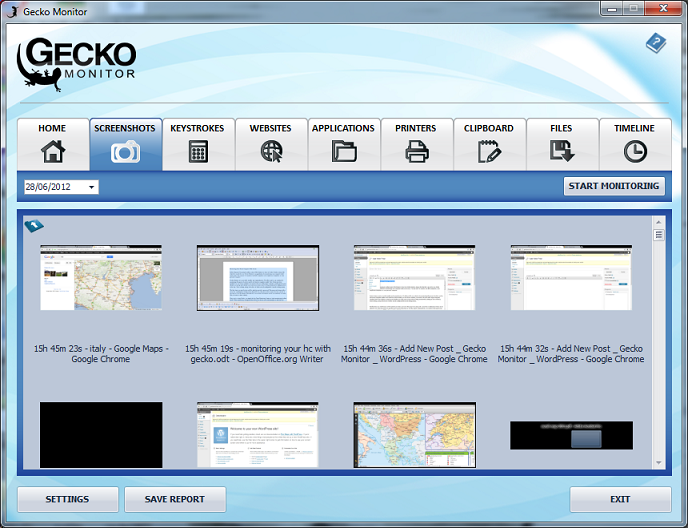
Combining powerful monitoring tools and stealth, Gecko Monitor has a number of great features including the ability to monitor every website visited, every program used and every keystroke pressed - as well as taking screenshots of everything that happens on screen.

2 Gecko Monitoring Software
The more advanced features of Gecko Monitor make this software the most advanced, all in one, computer monitoring solution on the market, why not download our free trial and see for yourself?


  • Takes screenshots of all windows & websites.
  • Logs every application used and tells you when it was used.
  • Logs every website visited and tells you when it was visited.
  • Reports what was typed into every application & website.
  • Monitors all printed documents, including times printed.
  • Emails reports to you remotely & secretly, at times set by you.
  • Innovative timeline feature - an easy to understand timeline of events.
  • Monitors all file activity, including saved, opened & deleted files.
  • Does all of this completely hidden, un-hides with a secret key combo.


My Take on the Software
I have been using this for quite some time now and have been impressed with how well this does monitor the actions on the computer that you monitor. This is great for parents that are trying to keep track of what their kids are looking at, but it also will log every action that you make too, so be aware. It tracks quite well and the reports that are emailed are informative. I love having the ability to see and track the movements of my kids while they are at such a formative age as it allows me to be able to then have conversations with them about what is or is not appropriate and been an informed parent.

Giveaway
2 Gecko Monitoring Software


----------------------------------------
New to the Divadom or to Dad of Divas Reviews?
Please Subscribe to my RSS Feed! Subscribe in a reader
Questions? Drop me a line at dadofdivas@gmail.com

Saturday, December 13, 2014

Splash Math ( @splashmath ) Makes Math Easy & Fun!

Splash Math

 photo disclaimer2_zps8af35ac1.jpg


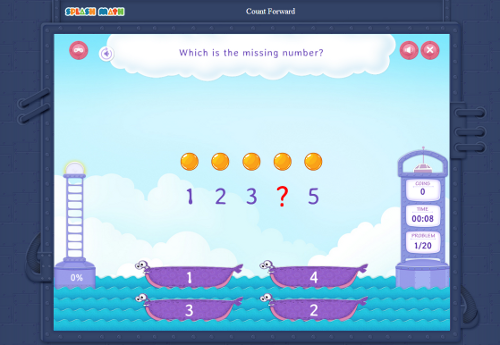
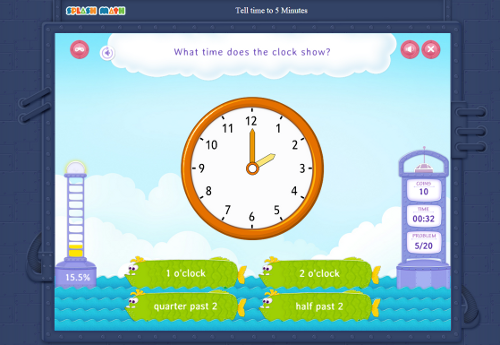
Splash Math is an award winning math program for kids of ages 5-10 which can be used both at homes and in schools. Splash Math has benefited over 9 million kids and has been used in over 50,000 classrooms. Available on iPads, Android tablets and web, Splash Math works across multiple platforms and devices.

Splash Math

Splash Math is an adaptive program. It personalizes math practice depending upon the child's level of mastery and covers all math skills for all grades - Kindergarten through 5. Splash Math collects the practice data and shares analytical reports with the parents/teachers.


Splash Math


Splash Math combines the best of both worlds. For a child, Splash Math appears to be like a game which rewards on getting answers correct, keeping them engaged all the time. For a parent, Splash Math covers all necessary math skills for their grade levels and provides crucial insight on the child's performance.
Splash Math

Special 20% discount - This holiday season, Splash Math is offering a Special 20% discount. Go to Save 20% Off Splash Math -  https://www.splashmath.com/parents/register?adc=USFG20&utm_campaign=WebOffer20&utm_medium=USFamilyGuide&utm_source=Bloggers to access the discount.


----------------------------------------
New to the Divadom or to Dad of Divas Reviews?
Please Subscribe to my RSS Feed! Subscribe in a reader
Questions? Drop me a line at dadofdivas@gmail.com

Monday, February 3, 2014

Saturday, November 16, 2013

Tips & Tools for Secure Holiday Shopping Off- and On-line & Lock Review

Master Lock 2120DWD Password Laptop Computer Lock
 photo disclaimer2_zps8af35ac1.jpg

Tis the season for online shopping, and with online sales expected to increase 13-15% this holiday season, it’s important to ensure online holiday experiences are safe ones. The holiday season should be fun and festive, and the joy of the season can be lost quickly if people interact with an un-safe website, lose important receipts or blow their budgets.

Master Lock and Mario Armstrong, Digital Lifestyle Expert™ have provided tips and tools to help navigate the holiday safety, securely and with as little stress as possible.

  1. Make smart online purchases. The convenience of online holiday shopping can quickly be derailed if you become a victim of identity theft due to sharing your credit card and shipping data with a non-secure site. Before entering any personal or financial information, check to make sure the website is secure.
  2. Click with caution. Consumers may be bombarded with link-heavy holiday emails this season sending well wishes or advertising hot gift items and sales. Consumers are advised to click links with caution to avoid a malware-spreading site.
  3. Set and track your budget. Avoid post-holiday regret or debt by setting a realistic budget and tracking your purchases to ensure you adhere to it. A variety of apps and websites can help you with your budget tracking goals, such as Mint.com or the Master Lock Vault.
  4. Keep digital receipts. Easily file away receipts from your holiday shopping in one place to cross-reference purchase dates and totals with your bank and credit card billing statements to check for any unfamiliar charges, or to facilitate easy returns after the holidays.
  5. Don't leave a digital trail to your gift purchases. If you are using a computer that other family members use and don't want them to see what sites you've visited, enable your browser's private browsing feature when researching and buying gifts.


About the Product
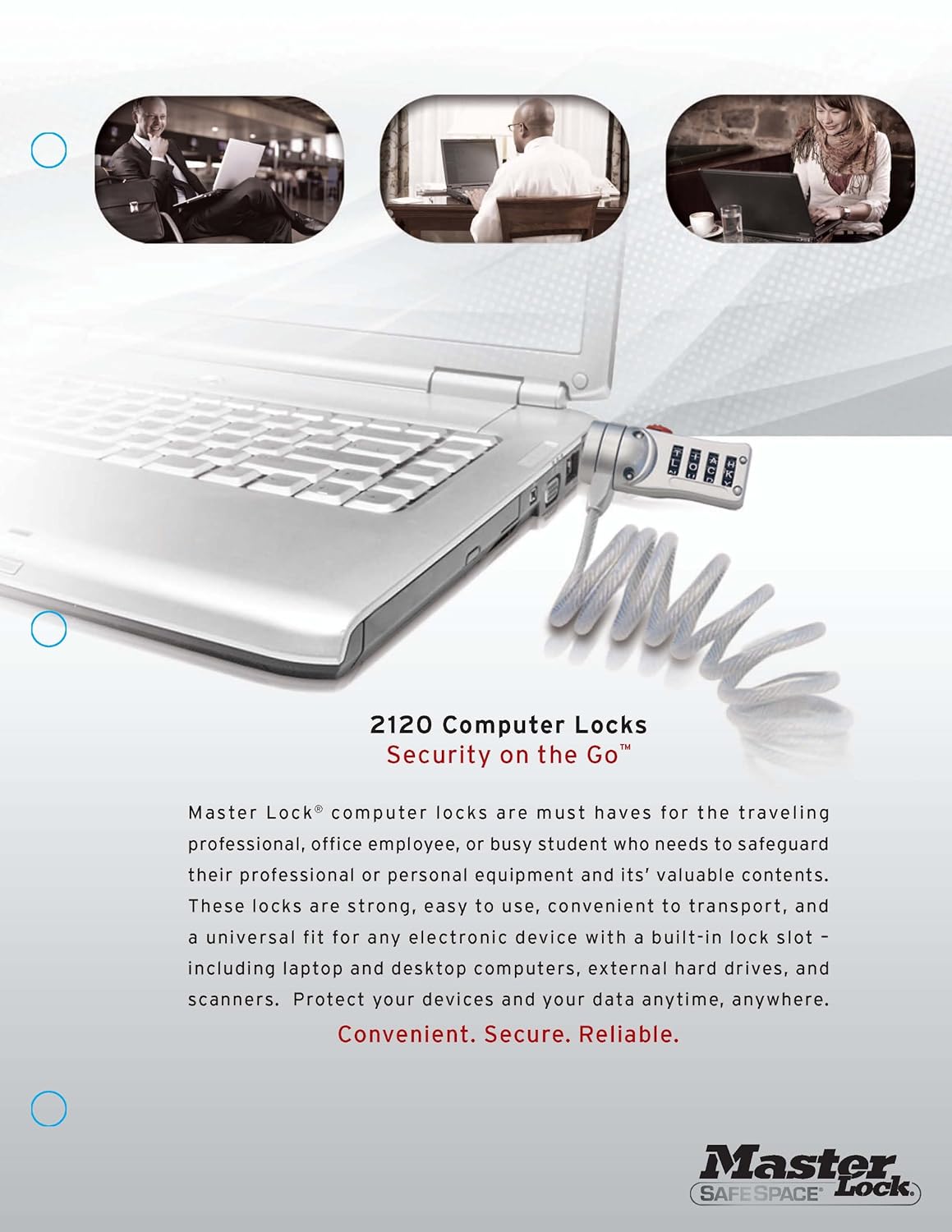
Master Lock 2120D computer lock is the must have for the traveling professional, office employee, or busy student who needs to safeguard their professional or personal equipment and its' valuable contents. This lock is strong, easy to use, convenient to transport, and a universal fit for any electronic device with a built in lock slot including laptop and desktop computers, external hard drives, and scanners. Protect your devices and your data, anywhere.
Master Lock 2120DWD Password Laptop Computer Lock
Product Features

  • Security on the go, ideal for campus, office, travel or home use
  • Secure any laptop, notebook, monitor or projector with a built in lock slot
  • Ultra portable self coiling cable extends from 3 inches to 6 feet
  • Trusted dial locking mechanism in an easy to spin and easy to use configuration
  • 10,000 combination possibilities for ultimate personalization


My Take on the Product
I loved how easy this lock was to set up and use. It connected easily to my laptop and I had no problems at all with the lock staying secure. This gave me peace of mind when I was out in public that I could leave my computer out without it walking away with someone else. The other thing that was great about this lock was the personalization that it affords you when it comes to the lock itself. You can make the password what you like or change it every now and again to make sure that no one gets to know your password! If you are looking for a great lock for your laptop, this is a great one in my perspective!


----------------------------------------
New to the Divadom or to Dad of Divas Reviews?
Please Subscribe to my RSS Feed! Subscribe in a reader
Questions? Drop me a line at dadofdivas@gmail.com

Friday, August 16, 2013

Book Review - Office 2013 for Dummies

Office 2013 for Dummies
 photo disclaimer2_zps8af35ac1.jpg

About the Book
Office 2013 For Dummies is the key to your brand new Office!

Packed with straightforward, friendly instruction, this update to one of the bestselling Office books of all time gets you thoroughly up to speed and helps you learn how to take full advantage of the new features in Office 2013. After coverage of the fundamentals, you'll discover how to spice up your Word documents, edit Excel spreadsheets and create formulas, add pizazz to your PowerPoint presentation, and much more.


  • Helps you harness the power of all five Office 2013 applications: Word, Excel, PowerPoint, Outlook, and Access
  • Discusses typing and formatting text in Word and easy ways to dress up your documents with color, graphics, and more
  • Demonstrates navigating and editing an Excel spreadsheet, creating formulas, and charting and analyzing Excel data
  • Walks you through creating a PowerPoint presentation and adding some punch with color, sound, pictures, and videos
  • Explores Outlook, including configuring e-mail, storing contacts, organizing tasks, scheduling your time, and setting appointments
  • Delves into designing Access databases, including editing, modifying, searching, sorting, and querying; also covers viewing and printing reports, and more
  • The fun and friendly approach of Office 2013 For Dummies makes doing Office work easy and efficient!


My Take on the Book
This book provides you with an easy to understand complete reference for understanding the new Microsoft 2013. As someone who started using this before reading this I can say that I wish that I had this before, or at least concurrently when I implemented the software. I felt that the book did a great job at keeping things simple and allowing me to have fun while learning too. For anyone that is making a transition form Office 2003, this is a must, as the way in which the programs are set up is completely different. Don' be a dummy, make your life easier and read this book today, you will be thankful that you did!


----------------------------------------
New to the Divadom or to Dad of Divas Reviews?
Please Subscribe to my RSS Feed! Subscribe in a reader
Questions? Drop me a line at dadofdivas@gmail.com

Friday, May 31, 2013

HP Unveils Desktop PC That Leaves the Desk Behind


HP recently announced the HP ENVY Rove20 mobile All-in-One PC, the company’s first mobile All-in-One PC, which frees the desktop PC from the desk and allows families and friends to enjoy a shared entertainment experience with a built-in battery, unique design and advanced touch technology.

HP also announced new consumer notebooks, all-in-one PCs and printers that give people more flexibility in how they access and share information. With affordable touch technology and new form factors, HP’s new additions provide seamless integration of technology into customers’ busy lives.


 “Customers are looking for mobility and flexibility in their computing devices to give families new ways to bring generations together,” said Ron Coughlin, senior vice president and general manager, Consumer PCs and Consumer Solutions, HP. “HP is evolving to meet our customers’ needs by designing next-generation form factors, like the Rove mobile All-in-One PC, which will enable people to connect, share and create in ways they never imagined.”

The desktop that leaves the desk behind
The HP ENVY Rove20 can easily move from upright to completely horizontal for a tabletop entertainment experience. Using advanced multitouch technology, multiple users can interact with games and more at the same time. Multiplayer games such as Electronic Arts’ Monopoly™, Fingertapps™ JigsWar Puzzle, Fingertapps Musical Instruments, and nsquared makewords are an ease to play when the PC is laid flat.

In addition to sharing games, families and friends can enjoy multimedia content on the 20-inch 1,600 x 900 IPS LED panel that enables wide viewing angles, rich colors and sharp graphics, while built-in Beats Audio™ offers crisp, clear sound. Powered by 4th generation Intel® Core™ processors, Intel HD graphics and 10-point touch, the HP ENVY Rove20 packs power for productivity tasks and an immersive entertainment experience with the ease of touch interaction.

Additional information about the HP ENVY Rove20 is available on The Next Bench. Affordable touch for every task

HP offers an intuitive Windows® 8 touch experience at great value with new all-in-one PCs and powerful consumer notebooks that feature multitouch display technology. With products at a range of price points, touch has never been more accessible. Users will benefit from new design elements that enhance durability, usability and performance.


  • The new HP Pavilion 20 TouchSmart All-in-One PC and the HP Pavilion 23 TouchSmart All-in-One PC offer a great user experience for the value-conscious consumer. The HP Pavilion 23 TouchSmart features a 23-inch diagonal full HD(1) display and an IPS panel with wide viewing angles for a stunning view of websites, videos and movies.
  • The HP Pavilion 11 TouchSmart Notebook provides an excellent Windows 8 experience with 11.6-inch, 10-point capacitive touch screen, and is the most affordable HP touch-enabled notebook.
  • The HP Pavilion 14 TouchSmart Sleekbook is the best-value touch-optimized HP Sleekbook, ideal for work or entertainment. Movies and gaming come alive powered by AMD A-series processors.


----------------------------------------
New to the Divadom or to Dad of Divas Reviews?
Please Subscribe to my RSS Feed! Subscribe in a reader
Questions? Drop me a line at dadofdivas@gmail.com

Tuesday, December 18, 2012

Book Review - Python for Kids: A Playful Introduction to Programming

About the Book
For anyone starting out in computer programming, the learning curve can be frustratingly steep. The simple stuff is easy enough to grasp, but anything actually useful remains frustratingly out of reach. And when you're a kid with no programming history behind you, the task can seem insurmountable.

A new book from No Starch Press promises to help soften that learning curve. Jason R. Briggs' Python for Kids (No Starch Press, December 2012, 344 pp., $34.95, ISBN 9781593274078) is a kid-friendly introduction to Python, one of the world's most powerful and widely used programming languages. "I can still quite vividly remember the feeling of learning to program at the age of eight," says Briggs. "When you program, you create something from nothing in a way that's quite different from any other medium. I hope readers experience the same sense of wonder as they work their way through Python for Kids."

Briggs packs his book with coding examples designed to teach readers how to create drawings, animations, and games. The sample programs in Python for Kids feature ravenous monsters, secret agents, and thieving ravens, and each chapter is full of wacky, colorful art by Miran Lipovača (of Learn You a Haskell for Great Good! fame). And to ensure maximum accuracy and non-boringness, Python for Kids was technically reviewed by both a programming professional and a middle school student (who programs in Python, Java, and JavaScript. Kids these days!).

But just because the book is fun doesn't mean that it sacrifices real learning. Python for Kids is a thorough introduction to Python (and computer science), complete with programming puzzles and chapter summaries to make sure the lessons stick. Readers learn how to:

  • Use fundamental data structures like lists, tuples, and maps
  • Organize and reuse code with functions and modules
  • Use control structures like loops and conditional statements
  • Draw shapes and patterns with Python's turtle module
  • Create games, animations, and other graphical wonders with tkinter

As the title suggests, Python for Kids is written for kids, but it's also suitable for any beginner who wants a gentle and fun introduction to programming. Python for Kids continues the long-standing No Starch Press tradition of making technical topics accessible, while hopefully minting a few new programmers along the way.

My Take on the Book
For any parent that has a child that is interested in computers, and especially more intricate details of programming languages, it many times can be difficult to find the correct text to any in their own learning and development. What was nice about this book was that it is written for kids to help them to better understand a programming language that they will need to know if they're going to delve deeper into programming itself. The book is written for young adults, and is very straightforward and allows the reader to understand programming on many levels. as someone that does not do a lot of programming, in reading this book I felt completely at ease at being able to understand how to use this as a resource to be able to better understand the Python programming language. Once you get beyond the basics, the book takes you even further and allows you to be able to use the basic knowledge to create and develop other more complex applications. How user-friendly the book was in general, is one of the nicest parts about this book. Filled with so much practical information, even in the most beginning the individual will learn so much. I highly recommend this for anyone that has a youngster that is trying to better understand the idea of game development as this book will open their eyes, and opened their world.

All opinions expressed in this review are my own and not influenced in any way by the company.  Any product claim, statistic, quote or other representation about a product or service should be verified with the manufacturer or provider. Please refer to this site's Disclaimer  for more information. I have been compensated or given a product free of charge, but that does not impact my views or opinions.

----------------------------------------
New to the Divadom or to Dad of Divas Reviews?
Please Subscribe to my RSS Feed! Subscribe in a reader
Questions? Drop me a line at dadofdivas@gmail.com

Monday, November 12, 2012

Software Review - Anime Studio Debut 9

About the Software

Everything you need to get started with 2-D animation

Anime Studio Debut is fun, easy, and exciting. It's a great tool for artistic expression and ideal for any age group. This entry-level animation software program is powerful yet affordable. You won't find your ideas or projects limited by the features of the software. Detailed video tutorials make learning the tools a snap, and pre-made content and characters help you get started right away.


Character Wizard Brand New Content
Hundreds of new characters. Quickly design ready-to-animate characters using the built-in Character Wizard. Select preset, dial-in body proportions, and choose from dozens of predesigned 2-D components such as hands, feet, mouths, eyes, noses, and heads.

Beginner's Mode
Start animating right away by choosing Beginner's Mode. Get exactly the help you need for each tool or feature with automatic roll over tips and built-in tutorials and sample files. You don't even have to leave the application to watch a video tutorial.


Rigging Your Characters Using Bones Makes Animating Easy
Bone-rigging is a fast and efficient alternative to tedious frame-by-frame animation. Add a skeleton to any image by pointing and clicking to create bones that overlay the parts of your image, to control arms or legs for example. Then bring your image to life by moving any individual bone point to create the pose or motion you want, while keeping your project organized with the sequencer and timeline.

Video/Motion Tracking
Add an object to an imported video that will follow the position and rotation of something, like a person's thumb. Just add tracking points that identify the item on the screen you want to follow.

Automatic Image Tracing Use Your Own Artwork
Import your scanned drawings or existing images and photos then convert them to vector drawings with the click of a button. Trace as black and white or edges only and adjust a number of settings to style your vector image. Color your vector art, resize without loss in image quality and animate it using bones.


Audio Recording, Sound Effects, and Automatic Lip Syncing
Add a soundtrack and lip-syncing to your animations. Record your own sound clips inside Anime Studio and adjust the pitch from high to low to fit your animated characters or import existing audio files into your project. Anime Studio will automatically insert them into your timeline, where you can adjust the timing and length to fit your scene. Using the Sequencer, freely move multiple sounds along the timeline to adjust syncing. Anime Studio supports WAV, AIFF, MP3 and M4A formats.

Huge Content Library Free Characters, Props, and Scenes Included
There is a huge variety of content included with Anime Studio, and the Pro version utilizes a powerful, flex-based Content Library, a great timesaver that allows you to organize content across Anime Studio projects. Browse through existing content, save your own creations to the library, and easily categorize content and search for items by keyword. Add selected content to your scenes through a simple drag and drop.


Lip-Syncing
Built-in lip-syncing in Anime Studio can help you save time. Simply load a sound file, and from the layer options of the layer you wish to sync, select the sound file from a pull-down menu. Anime Studio does the rest. Easily synchronize characters' lip and mouth movements to a sound file through a simple and intuitive process.

Enhanced, Powerful Drawing Tools; Easy-to-Use Automatic Effects
Customize colors and fills for your objects using the Style palette. Add line effects such as Shaded, Soft Edge, Halo, Image Texture, and Gradients. Apply a cartoon style effect to any image or video with a couple of mouse clicks. Easily select and remove unwanted background colors from your images using the Image Masking tool. Draw with pattern brushes and create perspective shadows with Anime Studio's layer masking feature.

Finish for Web, TV, Film, and Still Formats
Output finished animations to popular movie formats, including AVI, MOV, and Flash (SWF export for vector-based animations). Upload your creations directly to Facebook or YouTube. Gather up and organize all your project files in one location using the Gather Media feature.

Follow Path Tool
The Follow Path tool allows you to have any character or object follow and bend itself along a pre-drawn path (like a snake), making tons of animation possibilities easy.

Wacom Multi-Touch Support
Wacom Multi-Touch support allows you to use Wacom's new generation touch tablets with Anime Studio. Easily edit characters, scale, rotate, pan, zoom in and out of the canvas with simple finger gestures. Available on Bamboo, Intuos, and Cintiq touch-based tablets.

Product Description
Anime Studio is your complete animation program for creating 2D movies, cartoons, anime or cut out animations. Create your own desktop animated shorts in the style of SouthParkStudios.com and JibJab.com, or use it to produce animations for film, video or streaming over the web. Get started quickly with the Beginner's Mode. Create your own custom characters using the built-in Character Wizard and convert your existing paper drawings to ready-to-animate vector images with one click. Draw your own artwork using built-in brushes, import digital photos, add sound and video, and choose from pre-designed characters or create your own and make them talk using integrated lip-synching. The revolutionary bone rigging system makes animating fast and an efficient alternative to tedious frame-by-frame animation.

My Take on the Software
I ended up trying the Pro version of this before the Debut, and I should have done the opposite as this version was much easier to master than the Pro, though the Pro did have some more in-depth robust features within it.

I was quite impressed with the functionality of this version! I found the software to be easy to use and for someone with little to no experience with Anime the software was intuitive and you could easily start the process of designing some fun artwork in the stroke of a few keys.

What I loved most about this, was the character wizard that this has, as it makes the design process simple and flawless and in no time you will have created some great characters that you can use over and over again!

All-in-all this was amazing software that allows you to look and feel like a professional artist which is fun and exciting for someone who never thought he could be!

All opinions expressed in this review are my own and not influenced in any way by the company.  Any product claim, statistic, quote or other representation about a product or service should be verified with the manufacturer or provider. Please refer to this site's Disclaimer  for more information. I have been compensated or given a product free of charge, but that does not impact my views or opinions.

----------------------------------------
New to the Divadom or to Dad of Divas Reviews?
Please Subscribe to my RSS Feed! Subscribe in a reader
Questions? Drop me a line at dadofdivas@gmail.com
Wednesday, August 29, 2012

Book Review - Super Scratch Programming Adventure!: Learn to Program By Making Cool Games

About the Book
Scratch is a wildly popular educational programming language used by millions of first-time programmers worldwide. Developed by MIT's Media Lab, Scratch lets kids create interactive games, stories, music, and art and see the results of their work immediately. Just by combining colorful blocks of code, kids quickly learn computer programming concepts without having to master the cryptic syntaxes found in other programming languages.

Super Scratch Programming Adventure! (No Starch Press, August 2012, 160 pp., $24.95, ISBN 9781593274092) is a kid-friendly guide that promises to be the introduction to Scratch that young geeks (and the people who love them) have been waiting for. This full-color, cartoon-illustrated book teaches programming fundamentals with patient, step-by-step explanations and exciting programming challenges. Each chapter covers an arcade-inspired videogame that kids can create (and play!) in an afternoon.

Endorsed by Mitchel Resnick, MIT professor and the creator of Scratch, Super Scratch Programming Adventure! promises to make programming accessible and fun for any beginning programmer.

My Take on the Book
What was so great about this book was that it makes the idea of graphical programming so simple and no matter how inept you may be on the computer, you are taken step-by-step towards being able to consider yourself to be an programmer with this downloadable programming language. The book uses great graphics to aid in this learning and a mix of graphic novel and short easy to understand sections on what you need to do to actually develop a few pretty cool games. I followed the instructions (someone who has done very little programming) and it was very easy to do and very easy to understand thanks to this book!

All opinions expressed in this review are my own and not influenced in any way by the company.  Any product claim, statistic, quote or other representation about a product or service should be verified with the manufacturer or provider. Please refer to this site's Disclaimer  for more information. I have been compensated or given a product free of charge, but that does not impact my views or opinions.

-------------------------------------------------------------------------
New to the Divadom or to Dad of Divas Reviews?
Please Subscribe to my RSS Feed! Subscribe in a reader
Questions?Drop me a line at dadofdivas@gmail.com

Tuesday, December 6, 2011

Diamond Multimedia Offers Great Technology To Expand Your Home Wireless Network

About the Products

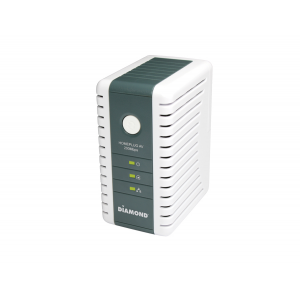
DIAMOND 200Mbps AV Powerline Ethernet Adapter Kit

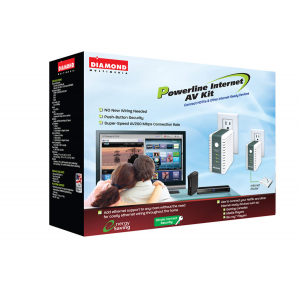
Now you can easily connect your internet ready devices to an Ethernet connection without the hassle of wiring. The Diamond HP200AVconnects PCs, modems, routers, game consoles and IP set-top boxes via power lines in your home.

Simply plug one adapter into your AC wall outlet and connect it to your router. Now you are free to plug the other adapter in any other AC wall outlet in your home providing internet access to your desired internet ready hardware.

With speed up to 200Mbps, it supports Internet Television (IP-TV in HD quality), video-on-demand, VoIP Telephony and fast Internet access. It achieves a range of up to 200 meters within a single power line grid, enabling the greatest reliability and flexibility to connect your network-enabled devices.

Add Ethernet support to any room without the need for costly Ethernet wiring throughout the home
Use to connect your Netflix and other internet-ready devices such as:

  • HDTVs
  • Media Players
  • Blu-ray Players
  • Gaming consoles


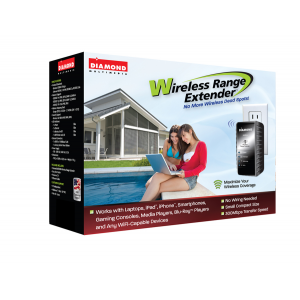
DIAMOND WR300N 300Mbps 802.11n Wireless Repeater, Range Extender, Wireless Access Point and Wireless Bridge Device

The WR300N wireless range extender and repeater will increase the range of your existing wireless coverage removing those wireless dead spots and or weak areas of your network.

Small form factor lets you plug the unit directly to the wall socket without any additional cables. For frequent travelers you can bring your own wireless network on the road. Use in your hotel room to transform your wired Ethernet internet access into a mobile WIFI network to share with multiple notebooks andsmartphones.

3 in 1 device

Wireless Range Extender
Receives weak wireless signals and extends the signal range to greater distances eliminating wireless dead spots.

Standalone Wireless Access Point
Create a wireless network by connecting the device to a wired router/cable modem or DSL modem.This small compact portable device can create wireless connectivity wherever you go. Use in your hotel room and turn a wired internet connection into a wireless internet connection.

Wireless Bridge device
Receives wireless signal from your home wireless network and convert to wired Ethernet connections for non wireless devices such as internet ready HDTV’s, gaming consoles (PS3) and internet ready blue ray players.


My Take on the Products


All opinions expressed in this review are my own and not influenced in any way by the company.  Any product claim, statistic, quote or other representation about a product or service should be verified with the manufacturer or provider. Please refer to this site's Disclaimer  for more information. I have been compensated or given a product free of charge, but that does not impact my views or opinions.

-------------------------------------------------------------------------
New to the Divadom or to Dad of Divas Reviews?
Please Subscribe to my RSS Feed! Subscribe in a reader
Questions?Drop me a line at dadofdivas@gmail.com
Monday, November 29, 2010

Dell Launches Inspiron Contest and Sweepstakes

To help organize the chaos this holiday, Dell has launched the Inspiron One 23 Storybook Contest and Sweepstakes (www.DellInspironStorybook.com) where you can create your own animated video storybook and enter to win tons of Dell prizes including an Inspiron One 23.  Additional details and features of the Storybook site include:

·         View customized storybooks by Bethenny Frankel and others who have inspiring 2010 stories

·         Create your own animated storybook and share it with friends and family.  It’s fun and easy!

·         Through 12/31, participants can enter their own storybook into the Inspiron One 23 Contest for a chance to win a Dell Home Technology Upgrade including:
§  Dell Streak, Zino HD with Blu-Ray, Sony Bravia 46” 3-D Ready HD TV, Xbox Kinect, 3-D Ready Home Theater Receiver System

·         Through 1/28, enter the Inspiron One 23 Sweepstakes for a chance to win an Inspiron One 23 – we’re giving away 3 every week! 

·         Click here for more information and to see a demonstration of the Inspiron One 23’s touch screen capabilities.

The Inspiron is meant to be the new family hub: an all-in-one resource.  At a retail value of $949, it is truly meant to be the family computer- located in the kitchen or family room where everyone gathers to play games, organize schedules and share experiences – a way to bring the family together through technology, organization, and learning.


All opinions expressed in this review are my own and not influenced in any way by the company.  Any product claim, statistic, quote or other representation about a product or service should be verified with the manufacturer or provider. Please refer to this site's Disclaimer  for more information. I have been compensated or given a product free of charge, but that does not impact my views or opinions. -------------------------------------------------------------------------------------------
New to the Divadom?
Please Subscribe to my RSS Feed! Subscribe in a reader
Questions?Drop me a line at dadofdivas@gmail.com

Thursday, June 17, 2010

Fathers Day Gift Idea for Dad of Divas - Help Generations Connect, Close Digital Divide

The Presto Printing Mailbox and Presto Mail Service lets you send email to those who don’t use a computer. Presto’s services take an email message and turns it into a beautiful, easy-to-read print out – letters, photos, attachments and all! The recipient doesn’t have to do anything or even need to own a computer. The messages are sent and printed automatically per the schedule you choose. Gone are the days of printing photos and sending them via snail mail.

In addition to photos and emails, Presto services allow family caregivers to set up reminders about appointments and medications that are sent directly to their loved ones.

Presto’s latest feature, DailySmile, further bridges the gap between Grandpa and his Facebook generation kids and grandkids. Now when you upload photos to Facebook you can tag a photo for Presto that will then be added to a DailySmile photo queue, which will deliver the tagged photos one per day. Think how much joy this feature can bring on a daily basis to people who love to get updates from their family and friends!

More information about Presto can be found at http://www.presto.com/

Friday, June 11, 2010

ThermaPAK Prevents Laptop Overheating

This laptop cooler offers special HeatShift material that shifts from solid to gel as it absorbs heat. 

Laptop overheating is a common problem for tech savvy dads and ThermaPAK is proud to offer eco-friendly solutions for laptop cooling needs.  Some unique features of our product are:

  • Portable - Each laptop cooler is lightweight, requires no refrigeration and has no messy cords, making it completely portable
  • Stylish - Slim HeatShift coolers are available in three different colors: black, pink and white
  • Eco-friendly - ThermaPAK competitors use fans to cool down your laptop while HeatShift technology requires absolutely no energy
Simply go to ThermaPAK.com and enter the special code: dadsgrads2010 and receive $10 off a purchase of $30 or more.

Heatshift Technology
Are you tired of?
  • Your lap burning from the heat of your notebook computer?
  • Your laptop computer shutting down due to overheating?
  • Your laptop computer components being damaged by excessive heat?
  • Your battery time being drained by a USB fan based laptop cooler?
  • Your inability to pack your laptop cooler when traveling because of its depth, heavy weight and general bulkiness.
  • The noise generated by your USB fan based cooler?
  • The USB cable from your cooler to your laptop getting in the way?
  • The rough, rigid edges of your laptop cooler?
ThermaPAK's patented HeatShift Technology™ is the culmination of nearly a decade in researching thermal dynamics. At the core of HeatShift Technology™ is a unique blend of phase changing material (PCM) created by our research and development engineers. This formula has proved successful in cooling laptops up to 6°C (11°F), with the following benefits:
Heat DissipationBenefits
  • Requires No Refrigeration
  • Requires No Laptop Power (which extends battery life)
  • Mobile and easy to carry (approved for airport security)
  • Can be used for notebooks of all brands sizes
  • Performance comparable to USB fans
The unipocket design used in the HeatShift Technology™ ensures maximum heat distribution from the notebook computer. Its design also creates air channels beneath the computer for proper ventilation and air passage.
How It Works
A device that transfers heat by conduction AND convection provides the maximum amount of heat exchange. Conduction is heat transferred directly from one object to another by physically touching. Convection is heat transferred by the movement of liquid molecules from warmer areas to cooler ones. HeatShift Technology™ pads utilize both conduction and convection to cool your laptop - and your lap! For more information about the effectiveness of HeatShift Technology™, please refer to our labratory results and notebook cooler product reviews.

My Take on the ProductI have definitely run into the issue of a laptop getting to hot to lay on your lap. In the past I have placed my own laptop on a book or some other buffer to keep my legs from getting burned (or so it felt like). I have to say that in hearing about this product I loved the idea and wanted to try it out. In using the product it definitely does live up to its potential. I used my laptop for a few hours and in placing it on this product, I did not have an issue with the heat that I had in the past. I have to say that if you are a user of laptops, and you use them for long periods of time in a place where you are keeping them on a spot that should not be heating up, this is a great product that will solve many of your problems. Check it out today!

All opinions expressed in this review are my own and not influenced in any way by the company.  Any product claim, statistic, quote or other representation about a product or service should be verified with the manufacturer or provider. Please refer to this site's Terms of Use  for more information. I have been compensated or given a product free of charge, but that does not impact my views or opinions.