Dad of Divas' Reviews: photos
Showing posts with label photos. Show all posts

Thursday, December 18, 2014

The #Cube Gives You Instant Access To Instagram #DadChat


 photo disclaimer2_zps8af35ac1.jpg

About the Cube
#Cube™ speaks to the enormous popularity of photo-sharing sites such as Instagram by enabling the socially connected to enlarge their viewing experience of photos and videos, from the smaller confines of a smart device. It is an extremely innovative, attractive, & easy-to-use wireless living photo canvas which showcases your favorite social photo & video streams.
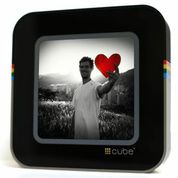
Among the immensely appealing features of #Cube™ are:


  • A large 8” square LCD touch screen display, giving the retro-inspired #Cube™ a modern touch.
  • Real-time and instant continuous delivery of a stream of photos and video clips, enabling users to enjoy and display real-time social network images from friends, family, and favorite celebrities.
  • Rechargeability and built-in Wi-Fi as well as free wireless software updates that enable new features and application support.


A photo posted by Christopher Lewis (@dadofdivas) on


My Take on the #Cube
I have never seen a device just like this. As someone who uses Instagram to share my pictures, sometimes I find it not that easy to be able to see my stream and be able to quickly like photos that come up too. The #Cube does all of this for you. The setup of the device was easy and at home I was quickly searching through the photos that were in my stream on Instagram. I loved that you had the flexibility to also search through hashtags and other ways so that you did not have to focus on only the home Instagram feed.

I had no problems on my own home network. When I tried to take this to work, because of a firewall I could not actually get it to connect. So I took it back home and now have it where I can see and use it on a daily basis.

I see this as a great gift for a parent or Grandparent that wants easy access to Instagram photos. The device also makes it very easy to like a photo, with only a touch of a button.

I found the battery to be long-lasting and while it does come with a cord, you do not have to use this if you do not want.

All-in-all I am impressed. The #Cube was easy to use and set up and really streams Instagram well and allows others to enjoy in the feed too.


----------------------------------------
New to the Divadom or to Dad of Divas Reviews?
Please Subscribe to my RSS Feed! Subscribe in a reader
Questions? Drop me a line at dadofdivas@gmail.com

Wednesday, February 26, 2014

Book Review - The Design Aglow Posing Guide for Family Portrait Photography

The Design Aglow Posing Guide for Family Portrait Photography
 photo disclaimer2_zps8af35ac1.jpg

About the Book
Get inspired to take family portraits your clients will love

Whether you’re facing your first family portrait shoot or are a seasoned professional looking for fresh inspiration, Design Aglow’s 100 ideas for posing newborns, babies, children, siblings, and families will help you approach each session brimming with confidence and creative ideas.

Design Aglow’s style-savvy approach has resonated with photographers (and their clients) everywhere. This curated collection reflects their modern sensibility, with poses from industry superstars such as Elizabeth Messina, Rachel Devine, Jose Villa, Tara Whitney, and Anna Kuperberg. You’ll also get tips on directing your subjects, follow-up shots for each setup, and behind-the-scenes lighting information.

Both eye candy and practical reference tool, The Design Aglow Posing Guide for Family Portrait Photography will inspire any family photographer, novice or expert, to “wake up” their style and take beautiful portraits for modern families.


My Take on the Book
The author wrote in the introduction to "use this beautiful book in two ways: first as an easy to transport visual guide for photography inspiration at sessions ; second in the small studio or home as a study guide of the techniques we employ for innovative photography. The chapters and information were written to assist the reader in discovering ways to add emotion, texture, and color to their photographs.

I enjoyed reading each section from newborn and babies, to children and siblings, and finally families. Each section gave specific suggestions about setting up the photo. You will gain not only valuable information from the text but also there is a beautiful photograph to illustrate the principles written about on the page.

If you are serious about improving your skills as a photographer, I believe you will find this book very helpful on that journey.


----------------------------------------
New to the Divadom or to Dad of Divas Reviews?
Please Subscribe to my RSS Feed! Subscribe in a reader
Questions? Drop me a line at dadofdivas@gmail.com

Book Review - Your Child in Pictures

Your Child in Pictures: The Parents' Guide to Photographing Your Toddler and Child from Age One to Ten
 photo disclaimer2_zps8af35ac1.jpg

About the Book
Photography tips for moms and dads on how to take everyday portraits of children

Celebrated photographer and best-selling author Me Ra Koh provides step-by-step instruction on photographing your family and taking pictures of your child. As a companion book to Your Baby in Pictures, Your Child in Pictures helps you learn to capture your child's special moments with 40 beautiful “photo recipes” that anyone can do, with any camera.

From first haircuts to first days of school, from snuggly teddy bears to favorite dress-up clothes, the toddler and childhood years are full of precious days that disappear all too soon. What parent doesn’t yearn to freeze the memory of their 2-year-old’s chubby cheeks, or their 6-year-old’s toothless grin?


My Take on the Book
As a father, mother, grandparents, or aunt and uncle, we want to take photographs of the adorable children in our lives. Me Ra Koh has written a book with excellent tips for any person who wants to photograph children.

The author has an entire chapter devoted to choosing a camera or using a camera you currently have in your possession. You will find great advice in this section.

I focused on the chapters which included information about photographing the ages of my girls. The author gave specific examples of topics for photos. One of the suggestions was photographing your child creating: a young artist at work. She wrote specific suggestions about the composition of the picture and how to capture the shot.

With older children , she suggested you ask permission to photograph them as often they are shy. You may want to compose a photo with them showing a hobby they enjoy, a pet they love, or their best friends.

I think one of the best suggestions was to take your time when photographing children. Don't necessarily go for quantity of photos but the quality in the ones you take. Try not to pose the children all the time and don't ask the children to say "cheese".

I felt the author had great suggestions for anyone wanting to improve their photographs and their photography skills.


----------------------------------------
New to the Divadom or to Dad of Divas Reviews?
Please Subscribe to my RSS Feed! Subscribe in a reader
Questions? Drop me a line at dadofdivas@gmail.com

Friday, October 4, 2013

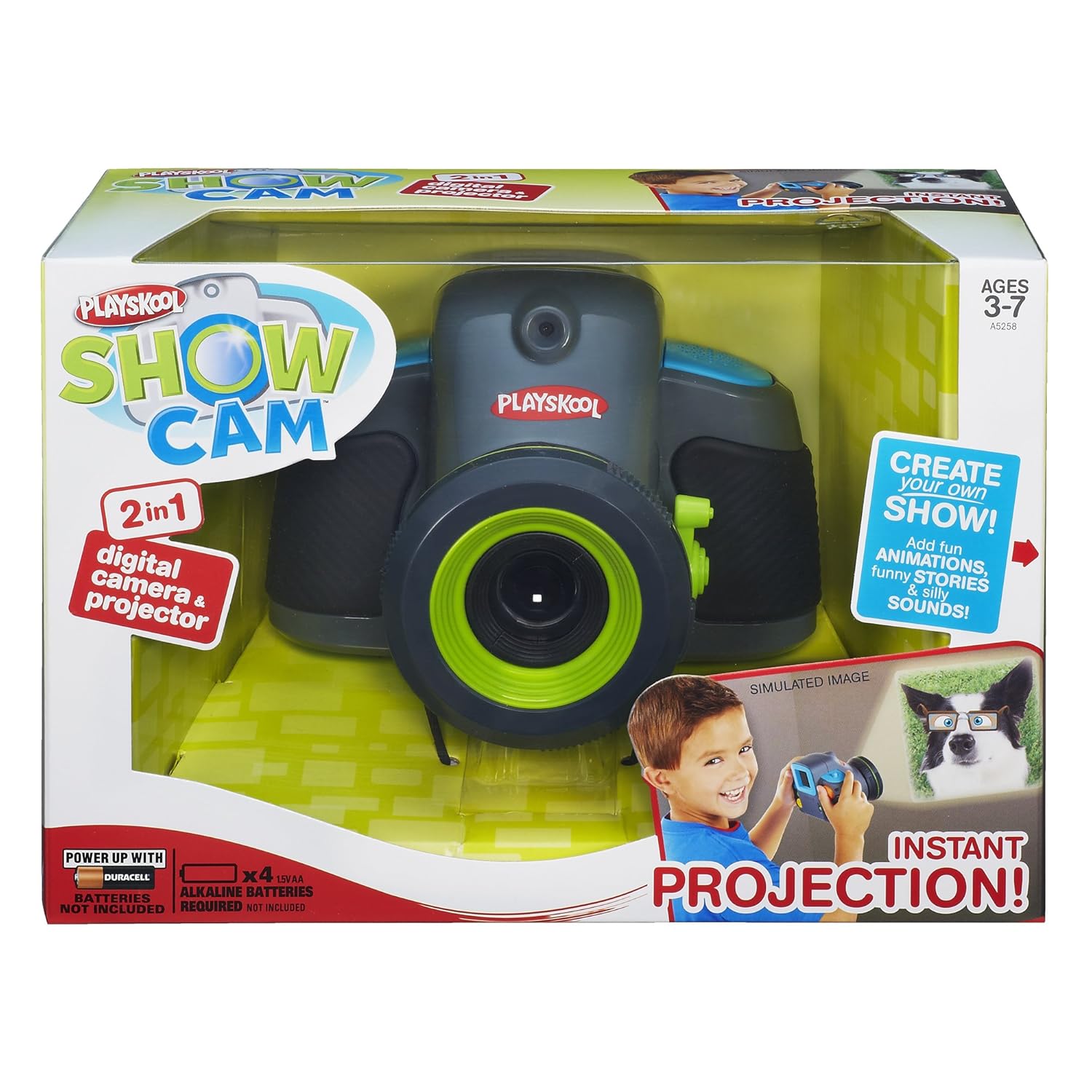
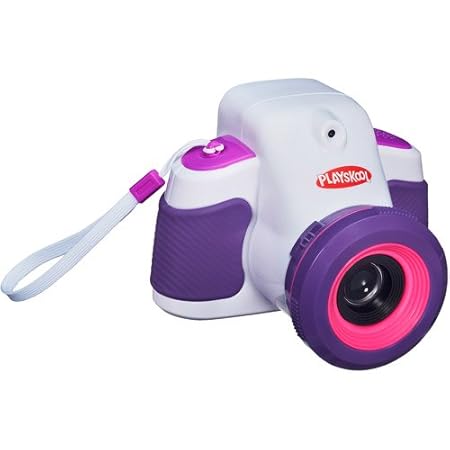
Product Review - Playskool Showcam 2-in-1 Digital Camera and Projector #GotItFree

Playskool Showcam 2-in-1 Digital Camera and Projector
 photo disclaimer2_zps8af35ac1.jpg

About the Product
Playskool Showcam Digital Camera and Projector

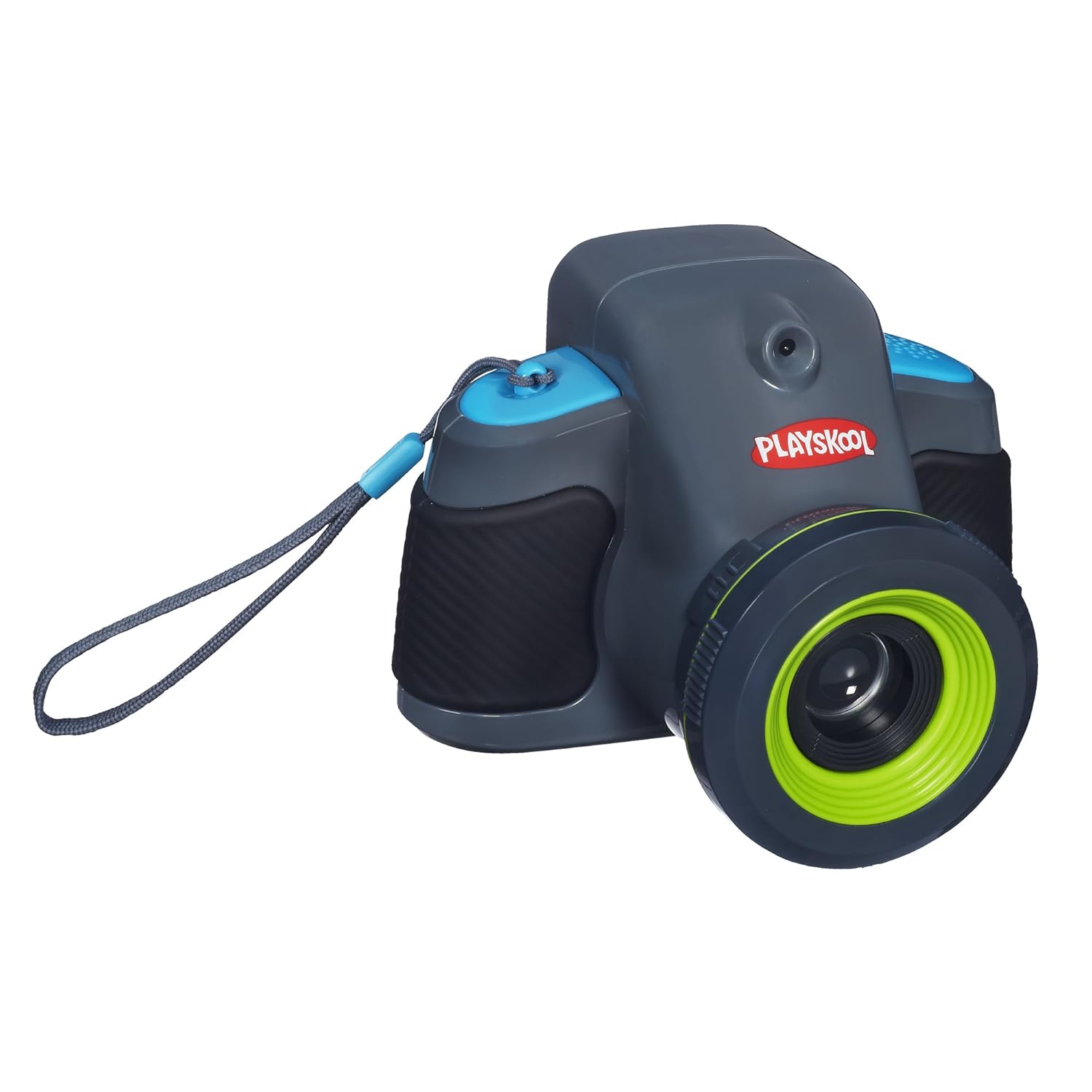
Snap a pic and show it off instantly with the ShowCam kids' camera from Playskool. One flip of the switch instantly turns this easy-to-use digital camera into a real working projector. With over 50 ways to customize their pics and 3 ways to display them through the projector, kids will love to create their own show over and over again.

Playskool Showcam 2-in-1 Digital Camera and Projector
The Showcam 2-in-1 camera and projector was designed with real kids in mind. The chunky size, soft grips and added hand strap make it so easy for little hands to hold and play. Big, colorful buttons let kids navigate the simple controls with little or no help. Plus, our built-in photo editing feature is literally child's play - no computer or extra software needed. They just press the Silly Button to choose from lots of fun stamps, frames, animations and sound effects, then snap a funny picture.

Playskool Showcam 2-in-1 Digital Camera and Projector

Now it's super easy for kids to star in their own show to share with friends and family. Take some pics in a well-lit area, then turn down the lights to get started. Stand about 2 feet from a wall or any other flat surface and your little photographer can choose from 3 different ways to make a show. One option is to set an automatic slideshow with fun sound effects. They can also choose from 5 slideshow themes, or scroll through each photo on their own. With so many ways to customize your show, smile, say "cheese", and get snappin'!

Playskool Showcam 2-in-1 Digital Camera and Projector
Great kids' electronic hardware helps make great fun. The ShowCam kids' camera can store approximately 1000 photos without a memory stick. Just like the built-in stamps and animations, you won't need any extra software to download and print your pics with your home computer - just your own USB cable (not included).


My Take on the Book
My five year old was the person that I had use this, as I knew that it was geared toward younger kids. She loved the idea of using this because she sees me using my cameras all of the time so she actually has been bugging me to have her own.

The design of this camera is quite rugged and large which is good for young children as it is easy to hold, but not too heavy either.

The camera was easy to use and it really did not take much time for me to show her how to use it, and she actually took it out of my own hands and wanted to just figure it out for herself.

I will say that for me I would have liked to have had a bit better quality in the pictures. With more and more cameras coming out with better quality, I think kids cameras should too. I say this because I noticed that quite a few of the pictures that she took were a bit blurry and/or dark especially when she was shooting inside. If the camera had a built in flash, this may have helped, but alas it did not.

One of the things that sets this camera apart from other kids cameras I have seen is the projector capability, as I have not seen this on other kids cameras. My daughter loved sharing her pictures on the wall in our living room!

Overall, I am pleased for the most part on how this runs, though would have liked to have had better quality images in general. My daughter loves this and your child will too!


----------------------------------------
New to the Divadom or to Dad of Divas Reviews?
Please Subscribe to my RSS Feed! Subscribe in a reader
Questions? Drop me a line at dadofdivas@gmail.com
Thursday, August 16, 2012

Shutterfly Long Live Summer Photo Contest Video


  All opinions expressed in this review are my own and not influenced in any way by the company.  Any product claim, statistic, quote or other representation about a product or service should be verified with the manufacturer or provider. Please refer to this site's Disclaimer  for more information. I have been compensated or given a product free of charge, but that does not impact my views or opinions.

-------------------------------------------------------------------------
New to the Divadom or to Dad of Divas Reviews?
Please Subscribe to my RSS Feed! Subscribe in a reader
Questions?Drop me a line at dadofdivas@gmail.com

Wednesday, July 11, 2012

Shutterfly's Long Live Summer Photo Contest

Long Live Summer – Facebook Photo Contest details - 7/9 – 8/12 Multi-week summer themed photo sweepstakes with instant win prizes.


Win a trip for four to The Bahamas and a professional photo shoot so you’ll remember your vacation forever.  All you need to do is upload your favorite photo and caption based on the theme of the week.  Get a gift from Shutterfly just for entering! You can enter at any point during the 5-week sweepstakes period.

PHOTO THEMES
  • Week 1(7/9): Americana
  • Week 2 (7/16): Great Outdoors
  • Week 3 (7/23): Water Fun
  • Week 4 (7/30): Sports & Activities
  • Week 5 (8/6): Parties & Celebrations


PRIZES
  • Instant win prizes just for submitting a photo!
  • Weekly prizes (contestants can enter one time/week)
  • Weekly featured photos: up to 5 weekly entries will be selected from the gallery and featured on the Facebook fan page and awarded a $500 gift card on Shutterfly and a copy of the new Lonely Planet travel photography book.
  • Grand prize: trip for 4 to Bahamas, 4 nights, family photo shoot


All opinions expressed in this review are my own and not influenced in any way by the company.  Any product claim, statistic, quote or other representation about a product or service should be verified with the manufacturer or provider. Please refer to this site's Disclaimer  for more information. I have been compensated or given a product free of charge, but that does not impact my views or opinions.

-------------------------------------------------------------------------
New to the Divadom or to Dad of Divas Reviews?
Please Subscribe to my RSS Feed! Subscribe in a reader
Questions?Drop me a line at dadofdivas@gmail.com

Wednesday, April 11, 2012

@Photodex Proshow Web Provides a Unique Mothers Day Gift

About the Product
Online video creation that's simple, fast and professionally polished.

ProShow Web automatically transforms your photos, video clips and music into a polished video slideshow, ready for you to stream online or download. Create shows online anywhere, on Mac or PC, with the option to customize and share in full HD 1080p.

Fast and easy slideshows from anywhere, Mac or PC.
Instantly create gorgeous video slideshows from anywhere. Automatic show creation with a custom twist lets gets a perfect show every time.

Professional polish with themes and effects.
From simple and serene to high-energy, there's dozens of themes and thousands of effects that let you create a show perfect for any occasion.

Tons of royalty-free music at your fingertips.
ProShow Web includes hundreds of hand-picked royalty-free music tracks from every style and genre. Adding music tracks to your show is a snap.

Share your creations in HD, online or on your TV.
Share your masterpiece on Facebook or YouTube. Download videos or embed them on your blog. You can even burn to DVD or Blu-ray up to 1080p.

My Take on the Product
This was an amazing product that was so easy to use. I was amazed to find the high quality productions that I could put together with using this product. I put together a great video for my mother and mother-in-law that I think they both will love and am looking forward to seeing what they think come mothers day and I believe that you too will be impressed with the quality and capability of the program itself.

What I found in the program is that is it quite intuitive. Unlike many other programs where you are tying images together you do not need to be an expert at the production aspect of the show as the program does all of the hard work for you. I also loved the fact that you could put music to the show and that the program itself had so many royalty free tracks that you could use!

Overall, I was impressed and I think you will be too!

All opinions expressed in this review are my own and not influenced in any way by the company.  Any product claim, statistic, quote or other representation about a product or service should be verified with the manufacturer or provider. Please refer to this site's Disclaimer  for more information. I have been compensated or given a product free of charge, but that does not impact my views or opinions.

-------------------------------------------------------------------------
New to the Divadom or to Dad of Divas Reviews?
Please Subscribe to my RSS Feed! Subscribe in a reader
Questions?Drop me a line at dadofdivas@gmail.com

Friday, September 9, 2011

New Photo Solutions from HP!

Today, HP announced products and solutions that make it easy for you to do more with your photos than ever before, and turn beloved imagery and fine art into home décor or fun photo gifts.

  • Photo books and more, made while you shop: Customers can now create photo posters, photo books, calendars and greeting cards in-store or online with same day pickup at over 2,600 Walmart and all Meijer stores throughout the U.S – perfect for last-minute gifts or special keepsakes.
  • Order online, pick-up in store: Consumers can now visit and other retail locations to create and order posters, photo books and more from the convenience of their own home, and pick them up the same day.  This service makes it easier and more convenient for consumers to turn their snapshots into treasured gifts and keepsakes during their shopping experience.
  • HP Faux Canvas: HP Faux Canvas is an affordable wall décor that enables you to turn personal photos and licensed content from paintings into decorative art. From Van Gogh and Monet to National Geographic photographs, HP offers an affordable solution to decorative art work. The initial offering that will be available exclusively at Walmart starting around only $20.

All opinions expressed in this review are my own and not influenced in any way by the company.  Any product claim, statistic, quote or other representation about a product or service should be verified with the manufacturer or provider. Please refer to this site's Disclaimer  for more information. I have been compensated or given a product free of charge, but that does not impact my views or opinions.

-------------------------------------------------------------------------
New to the Divadom or to Dad of Divas Reviews?
Please Subscribe to my RSS Feed! Subscribe in a reader
Questions?Drop me a line at dadofdivas@gmail.com

Tuesday, August 16, 2011

A new way to share your summer vacay


The social planning site Gogobot has just launched a new feature to capture your summer vacation!  Now in addition to showing off your cute little one’s first trip to the beach, you can share which beach, your review, and your rating, making it not only a cool way to capture memories, but also a tool for other friends and families to plan their next vacation.

Gogobot is the social travel planning site that helps you plan your trips using recommendations from your social network and just launched this slick digital scrapbook feature, called Collections.  The new feature allows you to easily curate the details on where you stayed, ate, went sight-seeing and more, in a chic, sharable layout –  a completely personalized account of your trip.  Just click a few buttons and share the link with your friends and family and voila – a fun, easy way to let your network know why haven’t been answering their emails!

The new feature is a super user-friendly way to share vacation with your Facebook friends, Twitter followers and anyone in your Gogobot network.

Check out some examples of ‘Collections’ here:

Foodie's guide to New York: http://www.gogobot.com/user/verlisia/passport/new_york_city-new_york_state

Vacation in Dubai: http://www.gogobot.com/user/chiu-ki_chan/passport/dubai

Trip to Maui: http://www.gogobot.com/user/travis_katz/passport/maui-hawaii

Las Vegas Bachelorette Weekend: http://www.gogobot.com/user/sharon_nguyen_yapp/passport/las_vegas


All opinions expressed in this review are my own and not influenced in any way by the company.  Any product claim, statistic, quote or other representation about a product or service should be verified with the manufacturer or provider. Please refer to this site's Disclaimer  for more information. I have been compensated or given a product free of charge, but that does not impact my views or opinions.

------------------------------------------------------------------------- 
New to the Divadom or to Dad of Divas Reviews
Please Subscribe to my RSS Feed! Subscribe in a reader
Questions?Drop me a line at dadofdivas@gmail.com

Thursday, June 16, 2011

Dad's life made easier with new photo sharing product

It’s summer.  For busy families everywhere, life is twice the fun and four times more hectic.  Check out a new photo sharing site that will make sharing these memories as simple as one click of the button.  Just made available, PhotoRocket was designed with moms and dads in mind who want to share their favorite photos to friends and family via email, Facebook, Flickr.  I invite you to download PhotoRocket <http://www.photorocket.com> here and tell me what you think!

All opinions expressed in this review are my own and not influenced in any way by the company.  Any product claim, statistic, quote or other representation about a product or service should be verified with the manufacturer or provider. Please refer to this site's Disclaimer  for more information. I have been compensated or given a product free of charge, but that does not impact my views or opinions.
 
------------------------------------------------------------------------------
New to the Divadom or to Dad of Divas Reviews?
Please Subscribe to my RSS Feed! Subscribe in a reader
Questions?Drop me a line at dadofdivas@gmail.com

Thursday, April 21, 2011

Celebrate Mother's Day with Great Photo Gifts from Snapfish

As you’re gearing up for Mother’s Day on May 8 and searching for the perfect keepsake for yourself or your readers, I wanted to provide you with a few gift recommendations from HP and Snapfish that we think moms will love! These include:

Available from Snapfish.com

  • Photo books – Honor mom by capturing her favorite moments in a personalized photo book. You can even archive her favorite family recipes! Snapfish offers photo books with many creative layouts and a range of sizes including 8x11, 8x8, 5x7 and even 4x6 flip books, great for all occasions.Leather bracelet with photo charm – Put mom’s favorite picture on a bracelet so she can wear it every day.
  • Sterling silver swinging locket – Looking for a gift she’ll cherish forever? Snapfish’s new sterling silver necklace with swinging locket allows you to display mom’s favorite photo in a locket that is sealed in a waterproof, UV-resistant coating to protect the image. Sent in a gift box, Snapfish does the wrapping for you.
  • Keepsake Box – Perfect for keeping all her prized possessions in one place, this beautiful keepsake box is made of dark-stained wood and features one glossy photo tile, measuring 5" X 2¼" deep.
  • Hardcover Journal – Inspire mom by helping her record her special day and year with a personalized journal by Paper Coterie. The journal features a photo and several custom designs she’ll flip for.
  • Photo greeting card – Who doesn’t love a thoughtful greeting card? But why settle for one you can buy anywhere?  Instead, show your appreciation for mom by sending her a personalized photo greeting card on her special day. Snapfish offers a myriad of selections with more than 3,000 designs. You can even create a recordable greeting card to show mom how much you care, whether she’s close or far.

    Available at your local Walmart:
  • Photo books– Looking for a thoughtful gift that’s easy on your wallet and your busy life?  You can create and purchase a treasured keepsake while catching up on errands at your local Walmart.  HP and Walmart offers instant Photo Books in sizes ranging from 4x6 to 12x12 (product availability varies by store). Even better, Walmart is offering a price rollback now through June 30th for great gifts at significant savings.
  • Photo greeting card – Waited until the last minute to get Mom a card, but don’t want to settle for the picked-over selection at the store?  Create a custom photo greeting card in-store at Walmart and watch Mom smile as she opens it. 
My Take on Snapfish and Their Services
I had the opportunity to try out Snapfish and their services and I was amazed at the breadth and depth of their products. From the pendant listed above to a myriad of different photo books, you can make almost any memento that you can think of. I played around with the site and was intrigued to find how easy the site was to use. In seconds you can upload pictures and start making a photo book or special mothers day card or other unique gift. The sky is the limit! For me, I used a giftcard that I received to make a photo book that I think someone will definitely like (I'm not saying whom for wandering eyes may be watching). 

So if you have a special mom in your life that you are looking for a wonderful unique gift, look no further than snapfish.com where you can let your creativity soar and you can make purely spectacular things!

All opinions expressed in this review are my own and not influenced in any way by the company.  Any product claim, statistic, quote or other representation about a product or service should be verified with the manufacturer or provider. Please refer to this site's Disclaimer  for more information. I have been compensated or given a product free of charge, but that does not impact my views or opinions.
   
-------------------------------------------------------------------------------------
New to the Divadom or to Dad of Divas Reviews
Please Subscribe to my RSS Feed! Subscribe in a reader 
Questions?Drop me a line at dadofdivas@gmail.com

Monday, February 14, 2011

Snapfish and Disney Promotion

Here’s Your Chance to Create Priceless Disney Memories
Snapfish wants you to make magical Disney memories on a 5-day/4-night Disney Parks vacation to either Walt Disney World® Resort in Florida or Disneyland® Resort in California. If you win, you'll also receive a $200 Snapfish gift certificate so you can turn your Disney experiences into shareable keepsakes. Enter here for your chance to win!

Make Your Own Disney Memory Calendar
You can also create a year full of Disney memories on your own 12 month 12 x 12 wall calendar – and the first 100,000 individuals who enter the sweepstakes will receive a redemption code to receive one free from Snapfish (taxes, shipping and handling not included; calendar must be redeemed by 2/28/11).

All opinions expressed in this review are my own and not influenced in any way by the company.  Any product claim, statistic, quote or other representation about a product or service should be verified with the manufacturer or provider. Please refer to this site's Disclaimer  for more information. I have been compensated or given a product free of charge, but that does not impact my views or opinions.
-------------------------------------------------------------------------------------------
New to the Divadom or to Dad of Divas Reviews?
Please Subscribe to my RSS Feed! Subscribe in a reader
Questions?Drop me a line at dadofdivas@gmail.com

Wednesday, January 12, 2011

Disney Junior and Disney Family.com are inviting families to “Be Part of the Magic” of Disney Junior

To celebrate the upcoming launch of Disney Junior on Monday, February 14, parents nationwide are invited to enter a favorite photo of their child into the “Be Part of the Magic” contest.   Six families will truly “be part of the magic” when their child’s picture is featured on-air during the premiere week of the newly branded Disney Junior programming block on Disney Channel. 

Entries will be voted upon by the public, with the six children (3 boys and 3 girls) ages 2-7 who receive the most votes being selected as the winners.  In addition to the initial six winners, Disney Channel may select other photos of children entered into the contest to be featured in an on-air promotion. Entries will be accepted from now until January 23.


All opinions expressed in this review are my own and not influenced in any way by the company.  Any product claim, statistic, quote or other representation about a product or service should be verified with the manufacturer or provider. Please refer to this site's Disclaimer  for more information. I have been compensated or given a product free of charge, but that does not impact my views or opinions.
-------------------------------------------------------------------------------------------
New to the Divadom?
Please Subscribe to my RSS Feed! Subscribe in a reader
Questions?Drop me a line at dadofdivas@gmail.com

Tuesday, January 11, 2011

Fun Idea: Unused Family Photos into Creative Collages

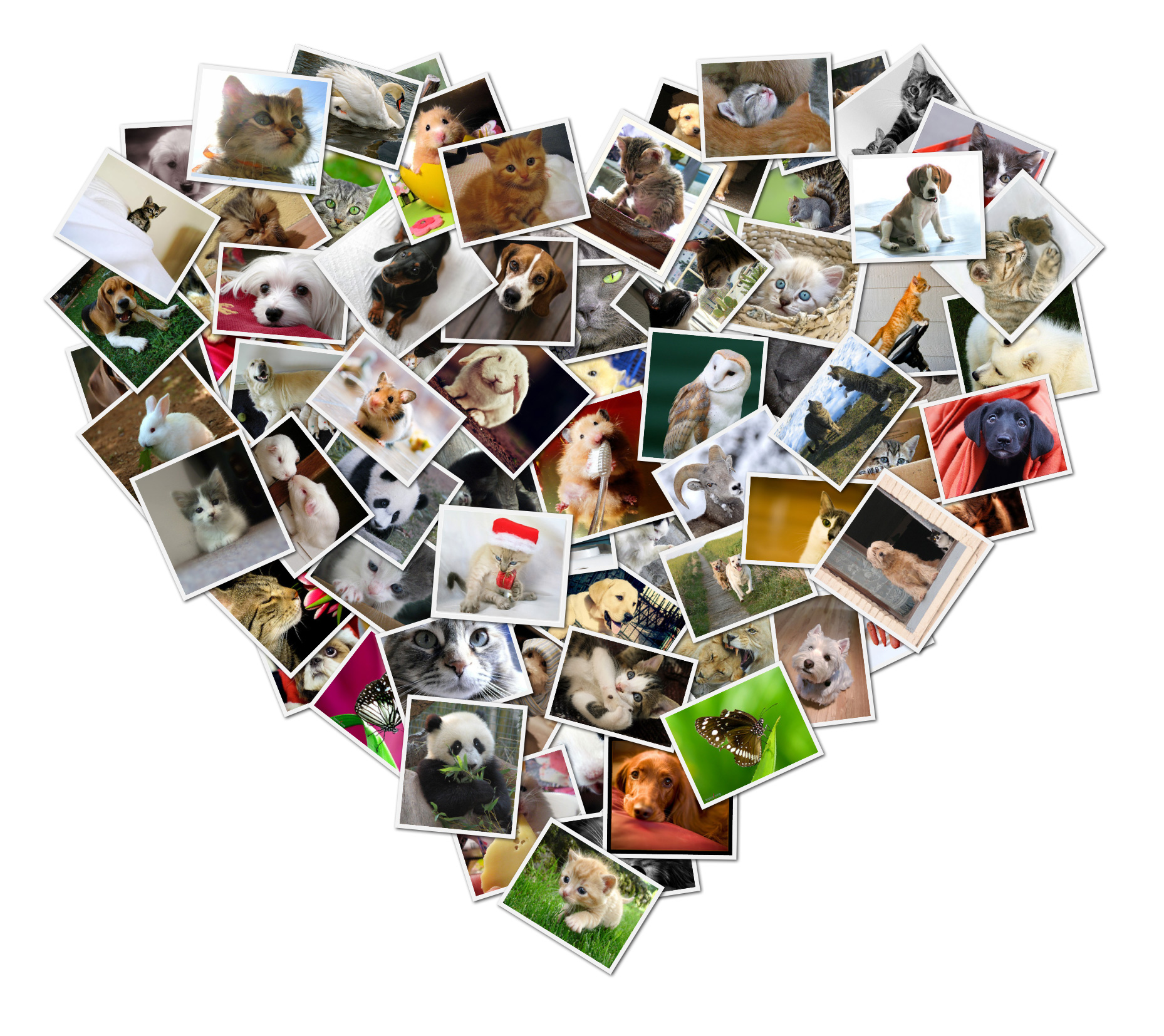
Do you have hundreds, if not thousands, of digital photos stranded in their hard drive and on social networking sites like Facebook. ShapeCollage.com allows parents to quickly make memorable personalized collages and transform unused digital photos into memorable gifts or keepsakes (these collages can easily be printed and framed). A heart shaped collage is also a great way to show your love for family members on special occasions like Valentine’s Day.
 
Here are a couple of examples: A Kid Collage (this can also be any custom shape, e.g. a heart shape) & a baby collage using your child's first initial -- both of which were made in minutes. 
 
Parents can adjust collage sizes, photo sizes, spacing between photos, backgrounds, photo border colors and design the shape of their collages for free at www.shapecollage.com. A pro upgrade version available for $25.


All opinions expressed in this review are my own and not influenced in any way by the company.  Any product claim, statistic, quote or other representation about a product or service should be verified with the manufacturer or provider. Please refer to this site's Disclaimer  for more information. I have been compensated or given a product free of charge, but that does not impact my views or opinions.


-------------------------------------------------------------------------------------------
New to the Divadom?
Please Subscribe to my RSS Feed! Subscribe in a reader
Questions?Drop me a line at dadofdivas@gmail.com

Wednesday, January 5, 2011

Isabella Unveils their Next Mobile Internet Device at CES

Today at CES in Las Vegas we announced Mini™, a wirelessly connected USB stick for the photo-sharing market. Powered by the AT&T mobile broadband network, Mini delivers real-time photo sharing to millions of unconnected digital photo frames, displays, and televisions through Isabella’s VizitMe content management service. Mini enables friends and family to deliver photos to the frame in just minutes by email or picture text message.

By connecting to VizitMe, users can directly upload photos to Mini, securely store their photo collection, and manage their dedicated contact list. Mini will also be equipped to receive third party content from partners like Photobucket and LIFE.com. Users can simply plug Mini into their existing digital photo frame or digital television to breathe new life into a previously unconnected device. Mini will be available in Q2 2011 on VizitMe.com and through other select online and offline retailers.

All opinions expressed in this review are my own and not influenced in any way by the company.  Any product claim, statistic, quote or other representation about a product or service should be verified with the manufacturer or provider. Please refer to this site's Disclaimer  for more information. I have been compensated or given a product free of charge, but that does not impact my views or opinions.
-------------------------------------------------------------------------------------------
New to the Divadom?
Please Subscribe to my RSS Feed! Subscribe in a reader
Questions?Drop me a line at dadofdivas@gmail.com

Tuesday, July 20, 2010

Renowned Photog Critiques Your Snapshots Via Facebook

Upload Your Favorite Amateur Photos to Kelsh's Facebook Page, "How to Photograph Your Baby," and Receive Professional-Level Tips for Improvement Mixed with a Dose of Humor

If you ever dreamed of having a renowned professional photographer provide constructive feedback on your amateur family photos, now is your chance.

Nick Kelsh, photographer and author of nine books including the best-selling, "How to Photograph Your Baby" (HowToPhotographYourBaby.com) and "Naked Babies," will provide a free assessment of your photos via his Facebook page, "How to Photograph Your Baby." Just upload your photo and Nick provides feedback on a daily basis.

Mixed in with Kelsh's didactic advice on anything such as lighting, distance, cropping and composition is a good dose of the photographer's humor.

After reading the manual on her camera from cover to cover, Facebook fan Kathy McLoud Dammes could not figure out how to take indoor pictures that are not dark or blurry. Kelsh's response: "Kathy, you're a train wreck! We have to get you fixed." The photographer then personally resolved McLoud Dammes' issues.

Sharlene Meestma Hyink was having trouble aligning her subjects in front of a horizontal line. Kelsh quickly helped her out with this perplexing issue. Says Meestma Hyink, "I have learned a lot from reading your page. I don't know of many professional photographers that would take the time that you have to look at all our photos and give us suggestions the way you have."

Kelsh is happy to help. "By offering assistance to amateur photographers via my 'How to Photograph Your Baby' Facebook page, anyone can capture memories effortlessly and compose images that will be cherished for years to come," says Kelsh.

For more information, visit "How to Photograph Your Baby" on Facebook.

All opinions expressed in this review are my own and not influenced in any way by the company.  Any product claim, statistic, quote or other representation about a product or service should be verified with the manufacturer or provider. Please refer to this site's Terms of Use  for more information. I have been compensated or given a product free of charge, but that does not impact my views or opinions.

-------------------------------------------------------------------------------------------
New to the Divadom?
Please Subscribe to my RSS Feed! Subscribe in a reader
Questions?Drop me a line at dadofdivas@gmail.com